Blog

Categorised by 'The Lab':
A workbench for site updates, experiments, side projects, and testing new ideas.

  • A lot has changed since my first post on Stockmantics from a web-build perspective. Since its inception, the primary focus has been getting the data and article generation output correct. Through many months of algorithm refinements, the generated articles are outputting daily stock market news more accurately than ever.

    However, this came at a cost to the website's look and feel. I never really invested much time into the design or the front-end build to a level that the Stockmantics website deserved, let alone a quality that met my own standards.

    If I'm honest, front-end isn't my forte or my main interest. I usually try to get away with using pre-built templates, but that has the detriment of never truly reflecting my vision; I find myself confined by the limitations of the template rather than the needs of the content.

    The main bug-bear for me was the article pages. Due to the amount of information required for a user to get an all-rounded insight into the daily market, the pages became difficult to navigate. I was quite persistent that all articles needed to display several key components alongside the copy:

    • Market Snapshot of 8 key market indices
    • Investor Action
    • The Market Mic Drop
    • Section Navigation

    If this was the result when viewing the site on a computer, then viewing on a mobile device certainly wasn't fairing any better. It was a cluttered experience that didn't do the data justice.

    Overall, I wasn't pleased with the first iteration of the Stockmantics website for one main reason: there simply wasn't enough investment of time. All my energy went into perfecting the background AI and data services, leaving the rest to be held together by low-cost hosting and only the most basic SEO practices. Looking back, I definitely questioned whether I'd done enough on the SEO front to give the content the reach it deserved.

    Now that I have proved the concept works, it is time to ditch everything that came before and start anew. I need a foundation that matches the quality of the data, and delaying things any further would only have a negative impact on what I'm trying to build.

    Before and After

    Rather than force you to read the whole post just to see the difference between the old and new—unless you feel ever so inclined, in which case I'd be more than happy for you to read further. Here are the before and after shots:

    Before

    After

    The Non-negotiables

    If I am going to start again, there is little point in re-treading old ground. It is time to take things to the next level by focusing on what I call "the non-negotiables":

    • Minimal Footprint: The application footprint needs to be as small as possible.
    • Better SEO: Incorporating proper schema data and much cleaner HTML.
    • Performance: Aiming for a minimum 95%+ Lighthouse score across both desktop and mobile.
    • Subtle Animation: Injecting some life into the pages without being distracting.
    • Clean Layout: Utilising white-space to let the content breathe.
    • Mobile-First UX: Improving the mobile view and rendering additional article content through intuitive pull-out menus.
    • PWA Integration: Adding Progressive Web App architecture with a prompt for users to install the site on their mobile devices.
    • Improved Archives: Restructuring the article listing page by grouping articles by year for better discovery.

    Architecture

    I have made the decision to move away from ASP.NET to a static-site generator using Gatsby JS. This shift will significantly reduce hosting costs by using Netlify, and I'll no longer have to worry about performance thanks to a robust caching framework.

    It was actually my original intention to use Gatsby, but I was concerned about exceeding the free monthly build minutes. At the time, I couldn't gauge how long each build would take to aggregate all the data required to populate the site. This is no longer a concern, as I've made several refinements to the background processes to ensure everything runs efficiently.

    The only addition to the background process was a new Timer Triggered Azure Function to trigger a build using Netlify's Build Hooks midday after all the stock news had been gathered.

    Front-end Build

    Lovable.dev has been my front-end saviour. It was able to translate exactly what I envisioned whilst also providing useful suggestions to enhance the overall look. Just like any other prompt-based AI tool, it works best with specifics and detail. Just like a painter without the right brushes, if you don't provide the right inputs, you can't expect a masterpiece.

    PWA

    One of the great things about working in a framework like Gatsby is that there is a service-worker plugin at the ready that provides the basic integration for a PWA. The user is notified when new updates or articles are added—though there is still a little more refinement required. A popup appears when viewing the site in-browser to install it as an app, bridging the gap between a website and a native experience.
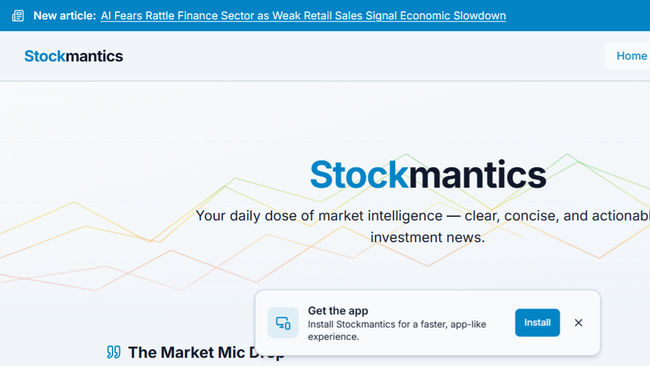
    PWA Notification

    Animations

    I didn't want to incorporate animation for animation's sake. It had to be subtle and relate to stocks. An idea I had was to mimic a line graph behind the homepage banner and market snapshot indices to render an upward (transitioning from red to green) or downward (transitioning from green to red) trend. This visual cue gives the data immediate context before the user even reads a number.

    Homepage Banner

    Market Snapshot

    Article Page Improvements

    I am very happy with how the article pages turned out. While a few refinements are still on the to-do list, it is incomparable to the previous version. You are now presented with a high-level overview of important information first—what I like to call the "first course"—before delving deeper into the "main course," which is the full article content.

    Viewing the articles on a mobile device is now actually a pleasure rather than a chore.

    Article Page In Mobile View

    Final Thoughts

    Even though the thought of rebuilding the Stockmantics site felt like an insurmountable task at times, it was time well invested. This is truly a passion project of mine, and I wanted the form to finally match the function.

    As a back-end developer by trade, the hard work that goes on behind the scenes isn't always obvious to the naked eye. This overhaul ensures that the sophisticated AI logic powering the site is finally reflected in a user interface that does it justice. It's no longer just a data project; it's a complete product.

    I look forward to making many more enhancements and improvements.

    If you haven't already, why don't you head on over to Stockmantics.com and take a look for yourself?

  • Published on
    -
    8 min read

    Stockmantics: A Personal AI Project

    In my previous post discussing my foray into the world of AI, I mentioned working on a personal project called "Stockmantics". But what exactly is Stockmantics, and why did I decide to build it?

    Stockmantics started because I needed a project where I could apply my AI knowledge to a real-world problem. In the end, I didn't have to look further than my own hobbies.

    Aside from coding, I’ve become heavily invested (pun intended) in the stock market. It all started shortly after COVID, when there was so much buzz online about people putting money into companies and index funds. Seeing the returns made by those who invested at the right time (during the lockdown of March 2020) opened my eyes to a potential new income stream. I didn't want to miss out on the fun, so I decided to learn the ropes of an area I knew nothing about. I just didn't expect it to turn into a full-time hobby.

    However, unlike most hobbies, I considered this one fraught with danger; one must err on the side of caution. After all, real money is at stake, and acting foolhardy or investing incorrectly can lead to significant losses.

    The Requirement

    When I became more confident in my investment strategy and the type of trader I wanted to be, I found one aspect consistently time-consuming: finding an easy-to-read daily digest in one place. I was tired of hopping from website to website or subscribing to endless newsletters just to get a clear picture.

    So, with the help of AI, I decided to build a tool that would do this for me, and Stockmantics was born. My requirements were as follows:

    • Market Snapshot: A quick look at key indices (S&P 500, FTSE 100, NASDAQ, Commodities, etc.).
    • Daily Summary: A single, concise sentence summarising what happened that day.
    • Global News: Key events from the USA, Europe, and Asia.
    • Crypto Updates: High-level developments in cryptocurrency, focusing on the majors.
    • Investor Action: A conclusion based on the day's news, suggesting what an investor should look out for.
    • Smart Glossary: Tooltipped definitions for stock market, investment, and economic terms to assist novice investors (and provide a constant refresher for myself).
    • Social-Media Integration: Automatic posting to X, highlighting key stories from the day's article.

    My philosophy for this personal project is simple: if it assists my own needs, that is a big win in itself. If someone else finds my method of digesting the day's financial news useful, that will be the icing on the cake. I decided early on that the success of Stockmantics would not be measured by visitor numbers or X followers, but by what I learnt during the development process and whether it truly works for me.

    Application Architecture

    The application architecture is based on the following Microsoft technologies:

    ASP.NET Core Razor Pages

    The website is a relatively small and simple application that consisted of the following pages:

    1. Homepage
    2. Article Listing
    3. Article
    4. Generic Content (for About/Terms/Disclaimer pages)

    A CMS wasn't needed as all content and data would be served from Azure Storage Tables. All there is from a content-management perspective is an authenticated "Article Management" area, where content generated by Gemini could be overridden when required.

    Azure Storage Tables

    I actively decided to use Azure Storage Tables over an SQL database to store all of the Stockmantics data as there was no relational element between each table. It also provided a lower cost alternative and quicker route to development.

    List of tables:

    • Article
    • MarketSnapshot
    • SocialShare
    • StockmarketGlossary
    • AppSetting

    Azure Blob

    For images that may be used in article content.

    Azure Functions

    All the grunt work getting the data is done by Timer Triggered Azure Functions that would fire shortly after the US Markets open (around midday GMT) in order to get the most up-to-date goings on in the market.

    A breakdown of the Azure Functions are as follows:

    • Generate News Article - queries stock market API's and news feeds to send to the Gemini API to construct an article tailored to my requirements. It is then stored in the Article table with related attributes and additional meta data suited to be served in a webpage.
    • Generate Social Posts - extracts 10 key facts from the generated news article to be transformed into tweets. The days generated tweets are stored until pushed to social media platforms.
    • Market Snapshot - uses the Yahoo Finance API to return the market price and percentage change for the core market indices. These values are then passed to the Gemini APIs "Grounding with Google Search" to provide sentiment and the reasons behind the change in price.
    • Post To X - publishes a tweet every 15 minutes.
    • Post To Bluesky - publishes a post every 15 minutes.

    The Chosen AI Engine

    It was always going to be a choice between Google Gemini and OpenAI. I was already familiar with both LLMs (Large Language Models), having casually thrown stock market queries at them—among other things—long before this project was even a glint in my eye. Ultimately, my decision hinged on two key factors:

    1. API: The ease of use and the reliability of the endpoints in returning structured data.
    2. Cost Factor: Being unfamiliar with the specific pricing structures of LLMs, I needed to estimate the cost per API call and project my monthly expenditure based on token usage. The OpenAI GPT API Pricing Calculator provided an excellent breakdown of costs across all major AI providers.

    I concluded that Google Gemini was the best fit for Stockmantics, primarily because the model I intended to use (gemini-2.5-flash) offered the most competitive pricing. The cost for one million input and output tokens works out to approximately $0.37, compared to OpenAI's $2.00.

    Furthermore, I felt that Gemini held a slight edge over OpenAI. They might have been late to the AI party, but they have certainly made up for lost time with impressive speed. It also had a card up its sleeve that I only discovered during development: Grounding with Google Search. This feature allows the model to access real-time information from the web, ensuring that the data returned is current rather than limited to a training cut-off date.

    Misjudging the Machine: Data is King!

    I initially was under the impression that I could simply ask the likes of OpenAI or Gemini to collate the day's stock market news, which I could then format to my liking. However, this proved to be a mistake. When dealing with fast-moving financial news, I found the results hit-and-miss. The models would frequently return information that was out of date or cite entirely incorrect market prices (even when using Grounding with Google Search).

    At this point, I realised I needed to take a step back and reassess my approach. It became clear that without a reliable, accurate data feed, this application would be of no use to man nor beast.

    The solution had to start with raw data, which the LLM could then use as its base to expand upon. For this, I found pulling financial data available through the likes of Yahoo Finance feeds to be invaluable, amongst other finance-related news feeds.

    Lengthy Vetting Period

    The transition from a proof-of-concept to the final version of Stockmantics required a lengthy vetting period, which continued weeks after releasing to live. The raw output from the LLM was rarely perfect on the first try, leading to a many iteratation of refinement. My focus was on four key areas:

    • Structure & Flow: Tweaking the system instructions to ensure the output was digestible, preventing the model from generating dense, unreadable paragraphs.
    • Sector Balance: Ensuring the article provided a holistic view of the market, rather than fixating solely on volatile tech stocks or the "Magnificent Seven".
    • Glossary Precision: Fine-tuning the tooltips to provide definitions that were accessible to novices without losing technical accuracy.
    • Geopolitical Neutrality: Ensuring that reports on world affairs, which often drive market sentiment were delivered with an objective and balanced tone.

    What I learnt from this process is that while anyone can write a basic AI prompt, getting the granular nuances right takes a significant amount of time. It is less about coding and more about the art of communication; you have to learn how to speak the model's language to get the consistent, high-quality output you need. Even now, I find myself still making ongoing tweaks for further improvement.

    If you compare the very first article published against one the more recent, I am hoping a vast difference will be noticed.

    Breakdown of Costs

    One of my main priorities was to keep the running costs on this project tight and I think things ended up being quite good on value. Here is a monthly breakdown:

    1. Website and Domain: £6.25
    2. Azure Services (Functions/Blob Storage/Tables): £1.10
    3. Google Gemini API: £4.00

    So we're looking at around £11.35 in total monthly costs. Not bad. Google Gemini costs will be the only item that I expect to fluctute based on the varied number of tokens utilised for each daily article.

    NOTE: Google Gemini and Azure services are only used weekdays for when the stock markets are open. So the costs are based on a 5 day week.

    Conclusion

    I am unsure what the long-term future holds for Stockmantics. Its lifespan ultimately depends on ongoing costs, maintenance effort, and whether I continue to find it useful for my own needs. However, for now, it serves a valuable purpose beyond just financial news: I have a robust, live application that acts as the perfect test bed for experimenting with new AI features and expanding my technical skillset.

    Fortunately, thanks to various architectural decisions and efficiency improvements, the running costs are currently sustainable, and the site itself is very low maintenance—touch wood! I foresee that further development will only be required if the external APIs change. I have already paid for a years worth of web hosting until October 2026 and will reassess things closer to that date.

    If you got this far, thank you for taking the time to read through the development process. If you are interested in seeing the final result, you can find all the links to Stockmantics below:

  • I've been using the gatsby-plugin-smoothscroll plugin in the majority of GatsbyJS builds to provide a nice smooth scrolling effect to a HTML element on a page. Unfortunately, it lacked the capability of providing an offset scroll to position, which is useful when a site has a fixed header or navigation.

    I decided to take the gatsby-plugin-smoothscroll plugin and simplify it so that it would not require a dependency on polyfilled smooth scrolling as this is native to most modern browsers. The plugin just contains a helper function that can be added to any onClick event with or without an offset parameter.

    Usage

    The plugin contains a smoothScrollTo helper function that can be imported onto the page:

    // This could be in your `pages/index.js` file.
    
    import smoothScrollTo from "gatsby-plugin-smoothscroll-offset";
    

    The smoothScrollTo function can then be used within an onClick event handler:

    <!-- Without offset -->
    <button onClick={() => smoothScrollTo("#some-id")}>My link without offset</button>
    
    <!-- With offset of 80px -->
    <button onClick={() => smoothScrollTo("#some-id", 80)}>My link with offset</button>
    

    Demo

    A demonstration of the plugin in use can be found by navigating to my Blog Archive page and clicking on any of the category links.

    Prior to this plugin, the category list header would be covered by the sticky navigation.

    Smooth Scrolling without Offset

    Now that an offset of 80px can be set, the category list header is now visible.

    Smooth Scrolling with Offset

    Links

  • If you haven't noticed (and I hope you have), back in June I finally released an update to my website to look more pleasing to the eye. This has been a long time coming after being on the back-burner for a few years.

    Embarrassingly, I’ve always stated in my many year in reviews that I planned on redeveloping this site over the next coming year, but never came to fruition. This is partly down to time and deciding to make content a priority. If I’m honest, it’s mostly down to lacking the skills and patience in carrying out the front-end development work.

    Thankfully, I managed to knuckle down and decided to become acquainted and learnt enough about HTML and CSS to get the site where it currently stands, with the help of Tailwind CSS and an open-source base template to act as a good starting point for a novice front-end developer.

    Tailwind CSS

    Very early on, I knew the only hope I had to give this site a new look was to use a front-end framework like Tailwind CSS, requiring a minimal learning curve to produce quick results. It’s definitely not a front-end framework to be sniffed at as more than 260000 developers have used it for their design system. So it’s a framework that is here to stay - a worthwhile investment to learn.

    Tailwind CSS is predominantly a CSS framework consisting of predefined classes to build websites directly within the markup without having to write a single line of custom CSS.

    As you’re styling directly within the markup, at first glance it can be overwhelming, especially where multiple classes need to be declared on a single HTML block. A vast difference when compared to the cleanliness of builds carried out by the very skilful team from where I work.

    It’s a small trade-off in an otherwise solid framework that gives substantial benefits in productivity. Primarily because Tailwind CSS classes aren’t very specific and gives a high level of customisability without you having to concoct CSS styles.

    Even though there are many utility classes to get acquainted with, once you have an understanding of the core concepts, front-end builds become less of an uphill battle. Through rebuilding my site, I managed to quite quickly get familiarity with creating different layouts based on viewport size and modifying margins and padding.

    I found it to be a very modular and component-driven framework, helping avoid repetition. There are UI kits on the market that give good examples of the power of Tailwind CSS that you can use to help speed up development:

    Using Tailwind CSS took away my fear of front-end development without having to think about Bootstrap, BEM, SASS mix-ins, custom utility classes, purge processing, etc.

    Base Template

    I gave myself a 3-week target (not full-time) to get the new site released and this couldn't have been done without getting a head start from a base theme. I found an open-source template built by Timothy Lin on Tailwind Awesome website that suited my key requirements:

    • Clean
    • Simple
    • Elegant
    • Maintainable
    • Easily customisable

    Another developer by the name of Leo, developed another variation of this already great template where I felt it met my requirements down to a tee.

    Even though the template code-base used was developed in Next.js, this did not matter as I could easily migrate the Tailwind markup into my Gatsby JS project. Getting Tailwind set up initially for Gatsby took a little tinkering to get right and to ensure the generated CSS footprint was kept relatively small.

    As you can see from the new site build, I was able to make further modifications to suit my requirements. This in itself is a testament to the original template build quality and the power of Tailwind CSS.

    Improvements

    As well as changing the look of my site, I thought it would be an opportune time to make a few other small enhancements.

    Google Ads

    Removing Google Ads had been on the forefront of my mind ever since I moved over to Netlify to host my website. Previously, it was a way to contribute to the yearly hosting cost. Now, this is no longer of any relevance (as I'm on the free Netlify free hosting plan), especially when weighing the importance of a meagre monetary return over improving the overall website look and load times of the site.

    In its place, I have a Buy Me A Coffee profile for those who would like to support the content I write.

    Updated Version of Gatsby JS

    It seemed natural to upgrade the version of Gatsby JS from version 2 to 4 during the reworking of my site to keep up-to-date with the latest changes and remove any deprecated code.

    Upgrading from version 2 to 4 took a little longer than I'd hoped as other elements required updating such as Node and NPM packages. This resulted in a lot of breaking changes within my code-base that I had to rectify.

    The process was arduous but worth doing as I found site builds in Netlify reduced significantly.

    Gatsby Build Caching

    I briefly spoke about improved Netlify build times (above) due to efficiencies in code changes relating to upgrading to Gatsby 4. There is one more quiver to my bow to aid further build efficiencies and that is by installing the netlify-plugin-gatsby-cache plugin within Netlify - one-click install.

    I highly recommend everyone who has a Gatsby site install this plugin as it instantly reduces build times. For a website like my own that houses over 300 posts the build minutes do start to add up.

    Features Yet To Be Implemented

    Even though the new version of my site is live, there are features I still plan on implementing.

    Algolia Site Search

    As part of getting a new version of my site released in such a short period, I had to focus on the core areas and everything else was secondary. One of the features that didn’t make the cut was the site search using Algolia.

    I do plan on reinstating the site search feature at some point as I found it helpful for me to search through my older posts and surprisingly (based on the stats) visitors to the site also made use of it.

    Short-Form Content

    I like the idea of posting smaller pieces of content that doesn't have to result in very lengthy written blog posts. Not sure what I will call this new section. There are only two names that come to mind: "Short-form" or "Bytesize". It could consist of the following types of content:

    • Small, concise code snippets.
    • Links to content I found useful online that could be useful in certain technical use-cases.
    • Book recommendations.
    • Quotes.
    • Thoughts on news articles - John Gruber style!

    At one point, I wrote blog posts I categorised as Quick Tips, till this date consists of a mere four blog posts that I never added to. I think the naming of this category wasn't quite right.

    I see this section functioning in a similar fashion to Marco Heine's Today I Learned.

    My Bookmarks

    I like the idea of having single page with a bunch of links to useful sites I keep going back to. It could be sites that you have never come across before, making all the more reason to share these links.

    Closing Thoughts

    I normally find a full-site rebuild quite trying at times. This time was different and there were two reasons for this.

    Firstly, I've already built the site in Gatsby JS and involved minimal code changes, even when taking into consideration the changes needed to update to version 4. Secondly, using Tailwind CSS as a front-end framework was a very rewarding experience especially when page builds come to fruition in such a quick turnaround.

    I hope you find the new design is more aesthetically pleasing and makes reading through blog posts a more enjoyable experience.

  • If you’re seeing this post, then this means I have fully made the transition to a static-generated website architecture using GatsbyJS. I started this process late December last year but then started taking it seriously into the new year. It’s been a learning process getting to grips with a new framework as well as a big jump for me and my site.

    Why has it been a big jump?

    Everything is static. I have downsized my website footprint exponentially. All 250+ blog posts have been migrated into markdown files, so from now on, I will be writing in markdown and (with the help of Netlify) pushing new content by a simple git commit. Until now, I have always had a website that used server-side frameworks that stored all my posts in a database. It’s quite scary moving to a framework that feels quite unnatural to how I would normally build sites and the word “static” when used in relation to a website reminds me of a bygone era.

    Process of Moving To Netlify

    I was pleasantly surprised by how easy the transition to Netlify was. There is a vast amount of resources available that makes for good reading before making the switch to live. After linking my website Bitbucket repository to a site, the only things left to do to make it live were the following:

    • Upload a _redirects file, listing out any redirects you require Netlify to handle. For GatsbyJS sites, this will need to be added to the /static directory.
    • Setup Environment variables to allow the application to easily switch between development and production states. For example, my robots.txt is set to be indexable when only in production mode.
    • Add CNAME records to your existing domain that point to your Netlify domain. For example, surindersite.netlify.com.
    • Issue a free Let’s Encrypt SSL certificate, which is easily done within the account Domain settings.

    Post live, the only thing that stumped me was the Netlify domain didn’t automatically redirect to my custom domain. This is something I thought Netlify would automatically handle once the domain records were updated. To get around this, an explicit domain 301 redirect needs to be added to your _redirects file.

    # Domain Redirect
    https://surinderbhomra.netlify.com/*     https://www.surinderbhomra.com/:splat    301!
    

    New Publishing Process

    Before making the switchover, I had to carry out some practice runs on how I would be updating my website just to be sure I could live with the new way of adding content. The process is now the following:

    1. Use “content/posts” branch to add a new blog post.
    2. Create a new .md file that consists of the date and slug. In my case, all my markdown files are named "2010-04-02---My-New-Post.md".
    3. Ensure all categories and tags in the markdown frontmatter is named correctly. This is an important step to ensure no unnecessary new categories or tags are created.
    4. Add any images used in the post to the site. The images should reference Imagekit.io.
    5. Check over the post locally.
    6. Push to master branch and let Netlify carry out the rest.

    Out of all the steps, I have only found steps 3 and 4 to require a little effort when compared to using a CMS platform, as previously, I could select from a predefined list of categories and upload images directly. Not a deal-breaker.

    Next Steps

    I had a tight deadline to ensure I made the move to Netlify before my current hosting renews for another year and still have quite a bit of improvement to make. Have you seen my Google Lighthouse score!?! It’s shockingly bad due to using the same HTML markup and CSS from my old site. I focused my efforts cramming in all the functionality to mimic how my site used to work and efficiencies in keeping build times to Netlify low.

    First thing on the list - rebuild website templates from the ground up.

  • Published on
    -
    2 min read

    Journey To GatsbyJS: Beta Site Release v2

    It’s taken me a little longer to make more progress as I’ve been stumped on how I would go about listing blog posts filtered by year and/or month. I’ve put extra effort in ensuring the full date is included in the URL for all my blog posts. In the process of doing this, I had to review and refactor the functions used within gatsby-node.js.

    Refactoring

    I noticed that I was carrying out build operations inefficiently and in some cases where they didn’t need to happen. For example, I was building individual blog post pages all over the place thinking I was required to do this in areas where I was listing blog posts. Reviewing my build operations had a positive impact and managed to reduce build times to Netlify from 2 minutes 17 seconds to 2 minutes 3 seconds. Where you are able to make build time savings, why wouldn’t you want to do this? By being efficient, you could squeeze in more builds within Netlify’s 300-minute monthly limit (based on free-tier).

    Page Speed Tests

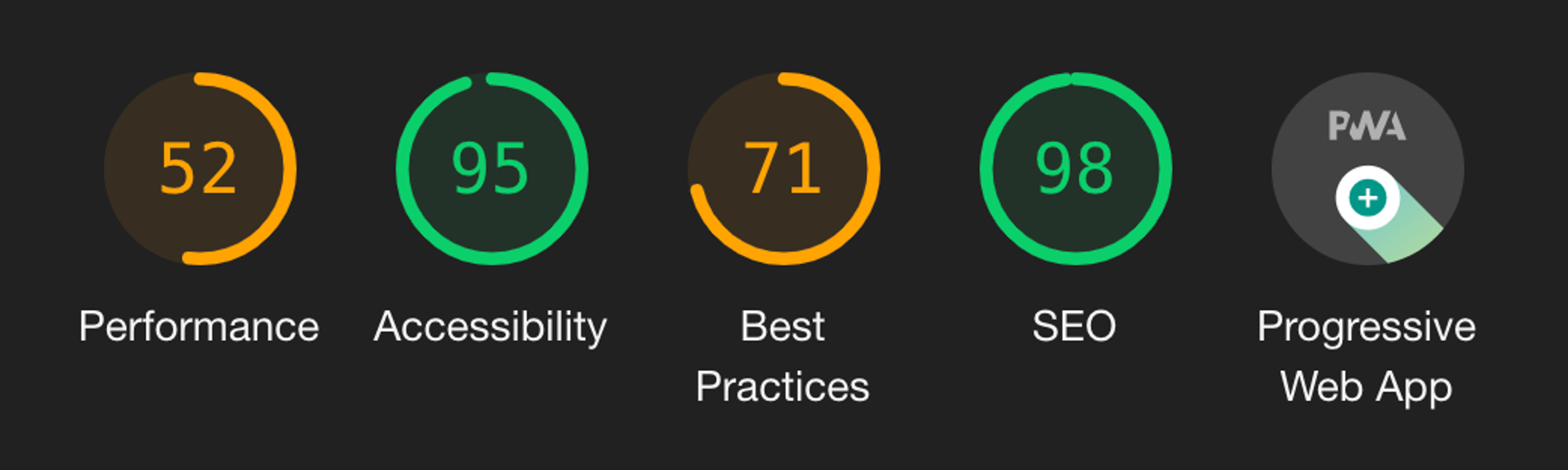
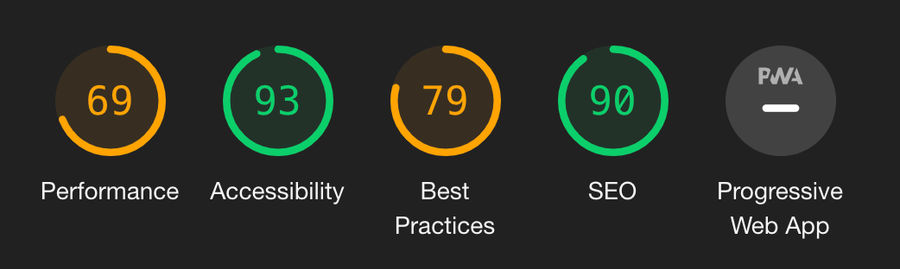
    The GatsyJS build is at a point where I can start carrying out some performance tests using Google Page Insights and Lighthouse. Overall, the tests have proved more favourable when compared against my current site. The Lighthouse analysis still proves there is work to be done, however, the static-site generator architecture sets you off to a good start with minimal effort.

    Google Lighthouse Stats - Current Site Current site

    Google Lighthouse Stats - Gatsby Site Gatsby site

    Current HTML/CSS Quality

    I can see the main area of failure is the HTML and CSS build... not my strong suit. The template has inherited performance-lag remnants from my current site and even though I have cleaned it up as well as I can, it’s not ideal. At this moment, I have to focus on function over form.

    Site Release Details

    This version contains the following:

    • Blog post-filtering by year and/or month. For example:
      • /Blog/2019
        • /Blog/2019/12
    • Refactored build functions.
    • Removed unneeded CSS from the old template (still got more to do).

    GatsbyJS Beta Site: http://surinderbhomra.netlify.com

  • For one of my side projects, I was asked to use Butter CMS to allow for basic blog integration using JavaScript. I have never heard or used Butter CMS before and was intrigued to know more about the platform.

    Butter CMS is another headless CMS variant that allows a developer to utilise API endpoints to push content to an application via an arrange of approaches. So nothing new here. Just like any headless CMS, the proof is in the pudding when it comes to the following factors:

    • Quality of features
    • Ease of integration
    • Price points
    • Quality of documentation

    I haven't had a chance to properly look into what Butter CMS fully has to offer, but from what I have seen from working on the requirements for this side project I was pleasently surprised. Found it really easy to get setup with minimal amount of fuss! For this project I used Butter CMS's Blog Engine package, which does exactly what it says on the tin. All the fields you need for writing blog posts are already provided.

    JavaScript Code

    My JavaScipt implementation is pretty basic and provides the following functionality:

    • Outputs a list of posts consisting of title, date and summary text
    • Pagination
    • Output a single blog post

    All key functionality is derived from the "ButterCMS" JavaScript file:

    /*****************************************************/
    /*                    Butter CMS                                 */
    /*****************************************************/
    var ButterCMS =
    {
        ButterCmsObj: null,
    
        "Init": function () {
            // Initiate Butter CMS.
            this.ButterCmsObj = new ButterCmsBlogData();
            this.ButterCmsObj.Init();
        },
        "GetBlogPosts": function () {
            BEButterCMS.ButterCmsObj.GetBlogPosts(1);
        },
        "GetSinglePost": function (slug) {
            BEButterCMS.ButterCmsObj.GetSinglePost(slug);
        }
    };
    
    /*****************************************************/
    /*                Butter CMS Data                         */
    /*****************************************************/
    function ButterCmsBlogData() {
        var apiKey = "<Enter API Key>",
            baseUrl = "/",
            butterInstance = null,
            $blogListingContainer = $("#posts"),
            $blogPostContainer = $("#post-individual"),
            pageSize = 10;
    
        // Initialise of the ButterCMSData object get the data.
        this.Init = function () {
            getCMSInstance();
        };
    
        // Returns a list of blog posts.
        this.GetBlogPosts = function (pageNo) {
            // The blog listing container needs to be cleared before any new markup is pushed.
            // For example when the next page of data is requested.
            $blogListingContainer.empty();
    
            // Request blog posts.
            butterInstance.post.list({ page: pageNo, page_size: pageSize }).then(function (resp) {
                var body = resp.data,
                    blogPostData = {
                        posts: body.data,
                        next_page: body.meta.next_page,
                        previous_page: body.meta.previous_page
                    };
    
                for (var i = 0; i < blogPostData.posts.length; i++) {
                    $blogListingContainer.append(blogPostListItem(blogPostData.posts[i]));
                }
    
                //----------BEGIN: Pagination--------------//
    
                $blogListingContainer.append("<div>");
    
                if (blogPostData.previous_page) {
                    $blogListingContainer.append("<a class=\"page-nav\" href=\"#\" data-pageno=" + blogPostData.previous_page + " href=\"\">Previous Page</a>");
                }
    
                if (blogPostData.next_page) {
                    $blogListingContainer.append("<a class=\"page-nav\" href=\"#\" data-pageno=" + blogPostData.next_page + " href=\"\">Next Page</a>");
                }
    
                $blogListingContainer.append("</div>");
    
                paginationOnClick();
    
                //----------END: Pagination--------------//
            });
        };
    
        // Retrieves a single blog post based on the current URL of the page if a slug has not been provided.
        this.GetSinglePost = function (slug) {
            var currentPath = location.pathname,
                blogSlug = slug === null ? currentPath.match(/([^\/]*)\/*$/)[1] : slug;
    
            butterInstance.post.retrieve(blogSlug).then(function (resp) {
                var post = resp.data.data;
    
                $blogPostContainer.append(blogPost(post));
            });
        };
    
        // Renders the HTML markup and fields for a single post.
        function blogPost(post) {
            var html = "";
    
            html = "<article>";
    
            html += "<h1>" + post.title + "</h1>";
            html += "<div>" + blogPostDateFormat(post.created) + "</div>";
            html += "<div>" + post.body + "</div>";
            
            html += "</article>";
    
            return html;
        }
    
        // Renders the HTML markup and fields when listing out blog posts.
        function blogPostListItem(post) {
            var html = "";
    
            html = "<h2><a href=" + baseUrl + post.url + ">" + post.title + "</a></h2>";
            html += "<div>" + blogPostDateFormat(post.created) + "</div>";
            html += "<p>" + post.summary + "</p>";
    
            if (post.featured_image) {
                html += "<img src=" + post.featured_image + " />";
            }
    
            return html;
        }
    
        // Set click event for previous/next pagination buttons and reload the current data.
        function paginationOnClick() {
            $(".page-nav").on("click", function (e) {
                e.preventDefault();
                var pageNo = $(this).data("pageno"),
                    butterCmsObj = new ButterCmsBlogData();
    
                butterCmsObj.Init();
                butterCmsObj.GetBlogPosts(pageNo);
            });
        }
    
        // Format the blog post date to dd/MM/yyyy HH:mm
        function blogPostDateFormat(date) {
            var dateObj = new Date(date);
    
            return [dateObj.getDate().padLeft(), (dateObj.getMonth() + 1).padLeft(), dateObj.getFullYear()].join('/') + ' ' + [dateObj.getHours().padLeft(), dateObj.getMinutes().padLeft()].join(':');
        }
    
        // Get instance of Butter CMS on initialise to make one call.
        function getCMSInstance() {
            butterInstance = new Butter(apiKey);
        }
    }
    
    // Set a prototype for padding numerical values.
    Number.prototype.padLeft = function (base, chr) {
        var len = (String(base || 10).length - String(this).length) + 1;
    
        return len > 0 ? new Array(len).join(chr || '0') + this : this;
    };
    

    To get a list of blog posts:

    // Initiate Butter CMS.
    BEButterCMS.Init();
    
    // Get all blog posts.
    BEButterCMS.GetBlogPosts();
    

    To get a single blog post, you will need to pass in the slug of the blog post via your own approach:

    // Initiate Butter CMS.
    BEButterCMS.Init();
    
    // Get single blog post.
    BEButterCMS.GetSinglePost(postSlug);
    
  • This site has been longing for an overhaul, both visually and especially behind the scenes. As you most likely have noticed, nothing has changed visually at this point in time - still using the home-cooked "Surinder theme". This should suffice in the meantime as it currently meets my basic requirements:

    • Bootstrapped to look good on various devices
    • Simple
    • Function over form - prioritises content first over "snazzy" design

    However, behind the scenes is a different story altogether and this is where I believe matters most. Afterall, half of web users expect a site to load in 2 seconds or less and they tend to abandon a site that isn’t loaded within 3 seconds. Damning statistics!

    The last time I overhauled the site was back in 2014 where I took a more substantial step form to current standards. What has changed since then? I have upgraded to Kentico 10, but this time using ASP.NET Web Forms over MVC.

    Using ASP.NET Web Form approach over MVC was very difficult decision for me. Felt like I was taking a backwards step in making my site better. I'm the kind of developer who gets a kick out of nice clean code output. MVC fulfils this requirement. Unfortunately, new development approach for building MVC sites from Kentico 9 onwards will not work under a free license.

    The need to use Kentico as a platform was too great, even after toying with the idea of moving to a different platform altogether. I love having the flexibility to customise my website to my hearts content. So I had to the option to either refit my site in Kentico 10 or Kentico Cloud. In the end, I chose Kentico 10. I will be writing in another post why I didn't opt for the latter. I'm still a major advocate of Kentico Cloud and started using it on other projects.

    The developers at Kentico weren't lying when they said that Kentico 10 is "better, stronger, faster". It really is! I no longer get the spinning loader for obscene duration of time whilst opening popups in the administration interface or lengthy startup times when the application has to restart.

    Upgrading from Kentico 8.0 to 10 alone was a great start. I have taken some additional steps to keep my site clean as possible:

    1. Disable view state on all pages, components and user controls.
    2. Caching static files, such as CSS, JS and images. You can see how I do this at web.config level from this post.
    3. Maximising Kentico's cache dependencies to cache all data.
    4. Took the extra step to export all site contents into a fresh installation of Kentico 10, resulting in a slightly smaller web project and database size.
    5. Restructured pages in the content tree to be more efficient when storing large number of pages under one section.

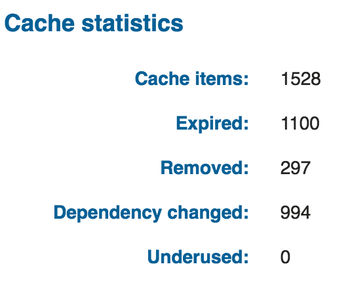
    I basically carried out the recommendations on optimising website performance and then some! My cache statatics have never been so high!

    My Kentico 10 Cache Statistics

    One slight improvement (been a long time coming) is better open graph support when sharing pages on Facebook and Twitter. Now my links look pretty within a tweet.

  • I've just completed working on a site that required PayPal integration to carry out credit card payments, using PayPal's REST API interface. I did find some aspects of the implementing PayPal's REST API a little confusing and there seemed to be a blurred line on what is the best approach. This is probably due to the vast number of .NET examples provided in PayPal's own Github repository.

    I decided to create my own PayPal REST API .NET Starter kit, by combining my own efforts together with PayPal documentation and code examples from other developers online. Feel free to fork it from my Bitbucket repository: https://bitbucket.org/SurinderBhomra/paypal-.net-starter-kit.

    The PayPal REST API .NET Starter kit contains everything you need to make a start in making your first card payment. It encompasses a very basic form to enter test transactions, as well as the following Nuget package references:

    • log4net
    • Newtonsoft.Json
    • PayPalCoreSDK
    • RestApiSDK

    All you'll need to do is create is a PayPal Client ID and Secret, build the solution and away you go. Every time you make a transaction, a "PaypalPayment" object is returned, containing useful information to be used at application level if the payment was a success and if not, the full error information.

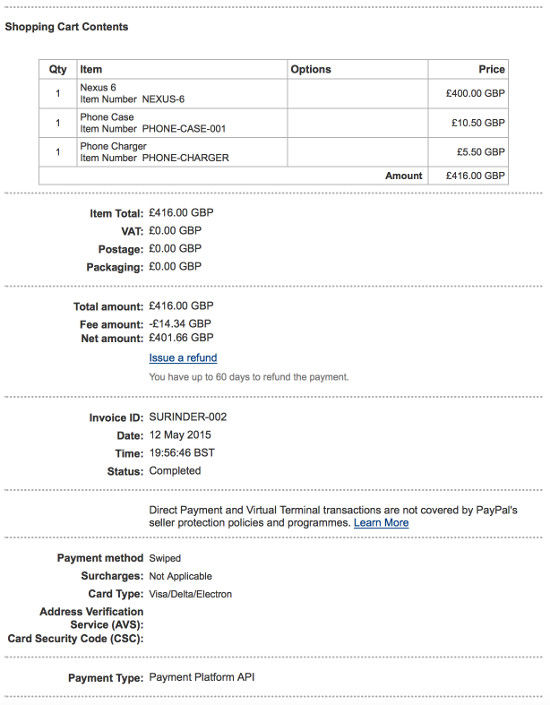
    A successful transaction will generate the following invoice to the user's PayPal account:

    PayPal Invoice Sample

    I am using my PayPal Starter kit as a foundation to build upon if I ever get the opportunity to develop more features, such as refunds.

    Feel free to modify my code and (even better!) add more features.

  • Welcome to my new and improved website built in Kentico 8 and MVC Razor 5.

    My old site was crying for an upgrade and now seemed like a good opportunity to make quite a few modifications, such as:

    • Upgrading to Kentico 8
    • Ditch ASP.NET Web Forms for MVC Razor 5
    • Refresh the front-end (designed by yours truly!) ;-)
    • Responsive support using Bootstrap
    • Refactored all code to improve website performance and caching

    The new build has been a bit of a pet project and allowed me to put into practice everything I've learnt from over the years since my last build.

    Still work in progress and more refinements are in the pipeline.

Support

If you've found anything on this blog useful, you can buy me a coffee. It's certainly not necessary but much appreciated!

Buy Me A Coffee