Blog

Tagged by 'photo'

  • An image doesn't just consist of pixels. It is a container full of additional information and structural inefficiencies hidden from the naked eye. When you capture a photo with a smartphone or a professional DSLR, the resulting file is almost always significantly larger than it needs to be for the web.

    This "image bloat" generally falls into two categories: Informational and Structural.

    • Informational: EXIF (Exchangeable Image File Format) data is metadata stored within the image header that includes GPS coordinates, camera serial numbers, and date-time stamps. While useful for photographers, this data adds unnecessary kilobytes to every upload and can even pose a privacy risk.
    • Structural: This is mainly down to resolution overkill, where modern cameras capture images at 12MP or higher - perfect for a billboard print, but massive for a website. But other reasons could be due to Sensor Noise where the digital sensor captures random variations in colour that the human eye can't distinguish, but the file's compression algorithm works overtime to preserve.

    The Hidden Cost of Raw Uploads

    When it comes to the process of uploading images through an online, we are often causing unnecessary strain on the end-user's connection as well as our own servers. By forcing a browser to transmit raw, unoptimised files, we create a high probability of failure through multiple, redundant requests.

    Every time a user on a unstable connection attempts to push a 10MB high-resolution photo, they are essentially gambling with the connection's stability. If that connection blips at 95%, the request fails, and the server is left with garbage data it can't use. The user is forced to start the entire process over again. This cycle doesn't just waste bandwidth; it inflates server CPU usage as it struggles to manage timed-out threads and increases the physical storage costs for data that the user never actually intended to be so large.

    Real-World Scenario

    I encountered this exact bottleneck while developing a valuation form. In this scenario, users were required to upload multiple high-quality photos of their assets for appraisal. On paper, this sounds simple. However, in the real world, users aren't always sitting on high-speed fibre-optic broadband. They are often out in the field, where the connection could be unstable.

    What was required is the ability for the image to be compressed on the users device before the upload process even starts. I found a JavaScript library that was worth a try: browser-image-compression.

    How The Client-Side Compression Works

    This library works by leveraging the browser's internal Canvas API and Web Workers to perform a digital reconstruction of the image. When a file is processed, it is drawn onto an invisible canvas at a set resolution, which instantly strips away all bloat like EXIF metadata and GPS coordinates. Then re-encodes the pixels using lossy compression algorithms to discard high-frequency noise.

    This entire magical process happens on a background thread (Web Worker), the image is crunched down to a fraction of its original size without freezing the user interface, ensuring the new lean file is ready for a faster upload.

    Results

    The difference in upload performance was night and day. Images that were originally 8–10MB were now being compressed to approximately 900KB. It is worth noting that the compression could have been even more aggressive; however, we capped the maximum size at 1MB, as we felt that was the perfect "sweet spot" for maintaining high visual quality in this scenario.

    By hitting that 900KB mark, we effectively reduced the data transfer requirements by 90%!

    Demo

    To see these performance gains in action, I have put together a live demo where you can upload your own high-resolution photos and see the real-time reduction in "image bloat" without any loss in visual quality.
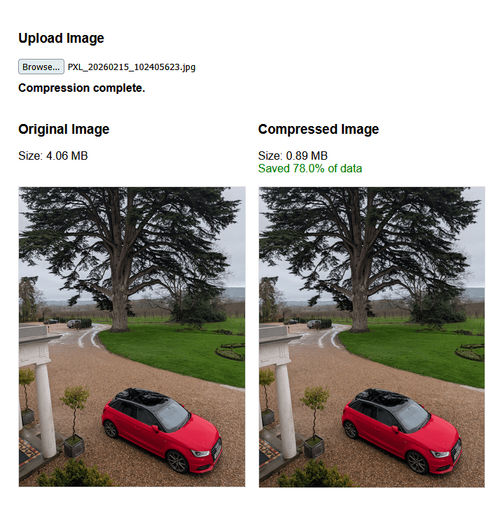
    Browser Image Compression - Demo

    Conclusion

    Implementing client-side compression isn't just a nice-to-have feature. It is a fundamental shift in how we handle user data and server resources. By moving the processing to the user's device, we achieve three major wins:

    • Reliability: Small files don't just upload faster; they succeed more often. By reducing an 8MB file to 900KB, you remove the timeout risk that plagues users on unstable connections.
    • Privacy by Default: Because the library reconstructs the image on a canvas, sensitive EXIF data and GPS coordinates are stripped before they ever reach your cloud storage. This reduces your liability and protects your users.
    • Infrastructure Savings: The backend no longer needs to spend expensive CPU cycles stripping metadata or resizing massive blobs. You save on bandwidth, processing power, and long-term storage costs.
  • I've written some code that outputs images using Instagram's Developer API. The code can either output images based on a user's profile or via search term.

    As you may already know, in order to get any form of information from any external API an access token is required. Before we dive into some code, the first thing that we need to do is register ourselves as an Instagram Developer by going to: http://instagram.com/developer/.

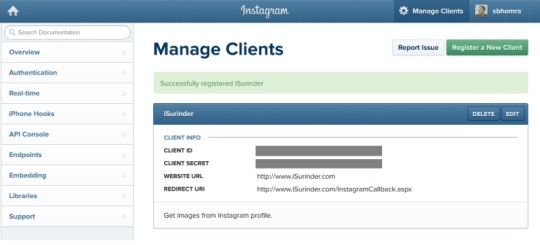
    Next, we need to register a new client specifically for our intended use. In my case, all I want to do is to get all image information from my own Instagram profile.

    Instagram API - Register New Client

    Here, you will be supplied with Client ID and Client Secret codes. But most importantly, you will need to set an OAuth Redirect URL (or Callback URL) for user's to authenticate your application.

    The strange thing I've noticed about the Instagram API is that a callback page is a compulsory requirement. Even if you are planning on carrying out something as simple as listing some images from your own profile where a public users intervention is not required.

    I'm not interested in their images, I'm interested in my own. I hope Instagram changes this soon. If Twitter can allow you to retrieve tweets by simply registering your application, why can't Instagram?

    From what I've read on Instagram's Google Group's is that an access token needs to only be generated once and they don't expire. But of course Instagram have stated:

    "These tokens are unique to a user and should be stored securely. Access tokens may expire at any time in the future."

    Just make sure you have some fail safe's in your code that carries out the re-authentication process within your application on the event access token has expired. In my own implementation, I've kept the callback page secret and new access token requests can be made within an Administration interface.

    So lets get to the code.

    Step 1: Authentication Request Classes

    These strongly-typed classes mirror the exact structure of the JSON returned from our authentication request. Even though we only require the "access_token" property, I've added additional information, such as details on the Instagram user making the request.

    public class AuthToken
    {
        [JsonProperty("access_token")]
        public string AccessToken { get; set; }
    
        [JsonProperty("user")]
        public InstagramUser User { get; set; }
    }
    
    public class InstagramUser
    {
        [JsonProperty("id")]
        public string ID { get; set; }
    
        [JsonProperty("username")]
        public string Username { get; set; }
    
        [JsonProperty("full_name")]
        public string FullName { get; set; }
    
        [JsonProperty("profile_picture")]
        public string ProfilePicture { get; set; }
    }
    

    It's worth noting at this point that I'm using Newtonsoft.Json framework.

    Step 2: Callback Page

    protected void Page_Load(object sender, EventArgs e)
    {
        if (!String.IsNullOrEmpty(Request["code"]) && !Page.IsPostBack)
        {
            try
            {
                string code = Request["code"].ToString();
    
                NameValueCollection parameters = new NameValueCollection();
                parameters.Add("client_id", ConfigurationManager.AppSettings["instagram.clientid"].ToString());
                parameters.Add("client_secret", ConfigurationManager.AppSettings["instagram.clientsecret"].ToString());
                parameters.Add("grant_type", "authorization_code");
                parameters.Add("redirect_uri", ConfigurationManager.AppSettings["instagram.redirecturi"].ToString());
                parameters.Add("code", code);
    
                WebClient client = new WebClient();
                var result = client.UploadValues("https://api.instagram.com/oauth/access_token", "POST", parameters);
    
                var response = System.Text.Encoding.Default.GetString(result);
    
                var jsResult = JsonConvert.DeserializeObject(response);
    
                //Store Access token in database
                InstagramAPI.StoreAccessToken(jsResult.AccessToken);
    
                Response.Redirect("/CallbackSummary.aspx?status=success", false);
            }
            catch (Exception ex)
            {  
                EventLogProvider.LogException("Instagram - Generate Authentication Key", "INSTAGRAM", ex);
    
                Response.Redirect("/CallbackSummary.aspx?status=error");
            }
        }
    }
    

    As you can see, I'm redirecting the user to a "CallbackSummary" page to show if the authentication request was either a success or failure. (Remember, the page is secured within my own Administration interface.)

    If the request is successful, the access token is stored.

    Step 3: Request Callback Page

    The last piece of the puzzle is to actually request our callback page by authorizing ourselves via Instagram API. In this case, I just have a simple page with the following mark up:

    <p>If Instagram fails to output images to the page, this maybe because a new Authorisation key needs to be generated.</p>
    <p>To generate a new key, press the button below and follow the required steps.</p>
    <a onclick="window.open('https://api.instagram.com/oauth/authorize/?client_id=<%=ConfigurationManager.AppSettings["instagram.clientid"].ToString() %>&redirect_uri=<%=ConfigurationManager.AppSettings["instagram.redirecturi"].ToString() %>&response_type=code', 'newwindow', config='height=476,width=641,toolbar=no, menubar=no, scrollbars=no, resizable=no,location=no,directories=no, status=no'); return false;" href="#" target="_parent">Generate</a>
    

    If all goes to plan, you should have successfully recieved the access token.

    I will post more Instagram code in future posts.

Support

If you've found anything on this blog useful, you can buy me a coffee. It's certainly not necessary but much appreciated!

Buy Me A Coffee