

High-Efficiency Image Uploads Through Client-side Compression
- Published on
- -3 min read

An image doesn't just consist of pixels. It is a container full of additional information and structural inefficiencies hidden from the naked eye. When you capture a photo with a smartphone or a professional DSLR, the resulting file is almost always significantly larger than it needs to be for the web.
This "image bloat" generally falls into two categories: Informational and Structural.
- Informational: EXIF (Exchangeable Image File Format) data is metadata stored within the image header that includes GPS coordinates, camera serial numbers, and date-time stamps. While useful for photographers, this data adds unnecessary kilobytes to every upload and can even pose a privacy risk.
- Structural: This is mainly down to resolution overkill, where modern cameras capture images at 12MP or higher - perfect for a billboard print, but massive for a website. But other reasons could be due to Sensor Noise where the digital sensor captures random variations in colour that the human eye can't distinguish, but the file's compression algorithm works overtime to preserve.
The Hidden Cost of Raw Uploads
When it comes to the process of uploading images online, we are often causing unnecessary strain on the end-user's connection as well as our own servers. By forcing a browser to transmit raw, unoptimised files, we create a high probability of failure through multiple, redundant requests.
Every time a user on a unstable connection attempts to push a 10MB high-resolution photo, they are essentially gambling with the connection's stability. If that connection blips at 95%, the request fails, and the server is left with garbage data it can't use. The user is forced to start the entire process over again. This cycle doesn't just waste bandwidth; it inflates server CPU usage as it struggles to manage timed-out threads and increases the physical storage costs for data that the user never actually intended to be so large.
Real-World Scenario
I encountered this exact bottleneck while developing a valuation form. In this scenario, users were required to upload multiple high-quality photos of their assets for appraisal. On paper, this sounds simple. However, in the real world, users aren't always sitting on high-speed fibre-optic broadband. They are often out in the field, where the connection could be unstable.
What was required is the ability for the image to be compressed on the users device before the upload process even starts. I found a JavaScript library that was worth a try: browser-image-compression.
How The Client-Side Compression Works
This library works by leveraging the browser's internal Canvas API and Web Workers to perform a digital reconstruction of the image. When a file is processed, it is drawn onto an invisible canvas at a set resolution, which instantly strips away all bloat like EXIF metadata and GPS coordinates. Then re-encodes the pixels using lossy compression algorithms to discard high-frequency noise.
This entire magical process happens on a background thread (Web Worker), the image is crunched down to a fraction of its original size without freezing the user interface, ensuring the new lean file is ready for a faster upload.
Results
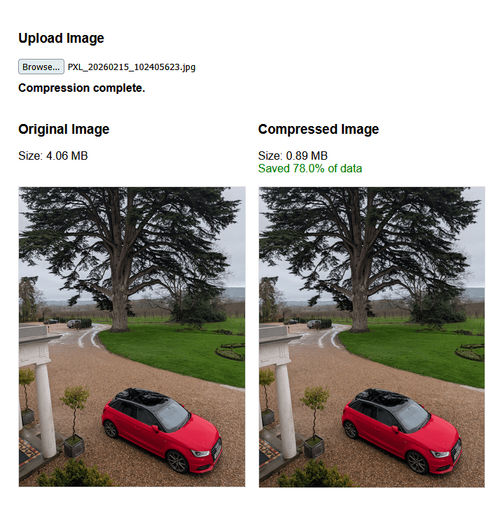
The difference in upload performance was night and day. Images that were originally 8–10MB were now being compressed to approximately 900KB. It is worth noting that the compression could have been even more aggressive; however, we capped the maximum size at 1MB, as we felt that was the perfect "sweet spot" for maintaining high visual quality in this scenario.
By hitting that 900KB mark, we effectively reduced the data transfer requirements by 90%!
Demo
To see these performance gains in action, I have put together a live demo where you can upload your own high-resolution photos and see the real-time reduction in "image bloat" without any loss in visual quality.
Conclusion
Implementing client-side compression isn't just a nice-to-have feature. It is a fundamental shift in how we handle user data and server resources. By moving the processing to the user's device, we achieve three major wins:
- Reliability: Small files don't just upload faster; they succeed more often. By reducing an 8MB file to 900KB, you remove the timeout risk that plagues users on unstable connections.
- Privacy by Default: Because the library reconstructs the image on a canvas, sensitive EXIF data and GPS coordinates are stripped before they ever reach your cloud storage. This reduces your liability and protects your users.
- Infrastructure Savings: The backend no longer needs to spend expensive CPU cycles stripping metadata or resizing massive blobs. You save on bandwidth, processing power, and long-term storage costs.
Before you go...
If you've found this post helpful, you can buy me a coffee. It's certainly not necessary but much appreciated!

Leave A Comment
If you have any questions or suggestions, feel free to leave a comment. Your comment will not only help others, but also myself.