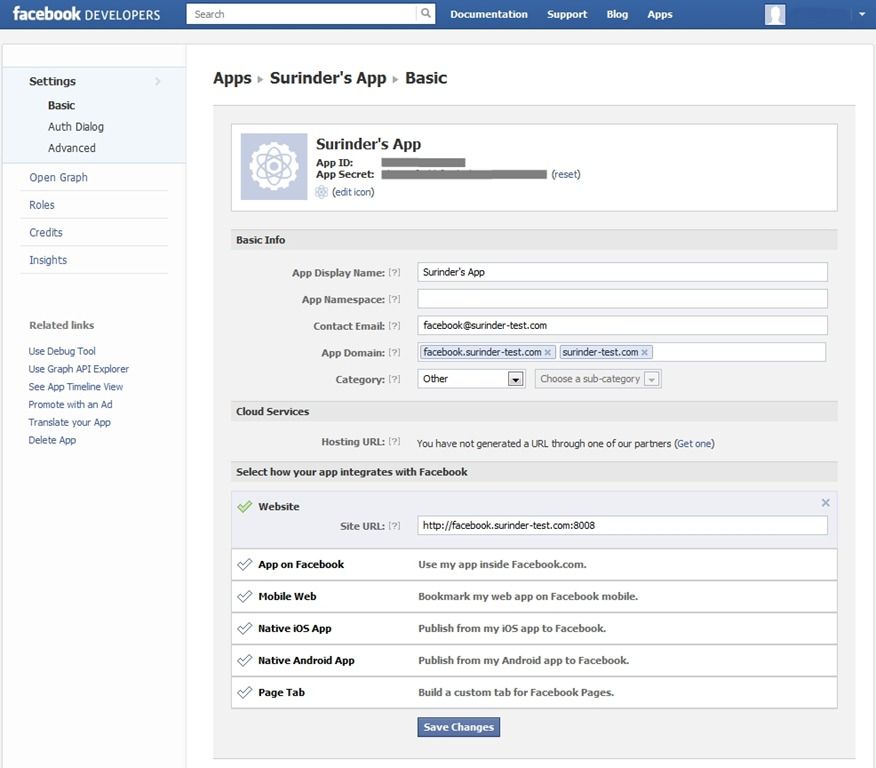
Having the ability to run and develop Facebook applications within the comfort of a local environment is a must. Previously, I always thought in order to work on Facebook applications a public facing URL was required to allow Facebook to communicate with your application directly. Fortunately this is not the case.
All you need to do is set up a server alias in your hosts file and use this alias as an “App Domain” within your Facebook Application settings.
Quick Example
I created a new site in Microsoft IIS called: “facebook.surinder-test.com” running under port 8008. Feel free to change the port number to your own choosing. To browse the site we need to add this web address to Windows host file (C:\Windows\System32\drivers\etc):
# localhost name resolution is handled within DNS itself.
#    127.0.0.1       localhost
#    ::1             localhost

127.0.0.1     facebook.surinder-test.com
127.0.0.1     localhost
This will route all your requests to ”facebook.surinder-test.com” to localhost.
Next, make the following changes to your Facebook Application settings page:
- App Domain: facebook.surinder-test.com, surinder-test.com
- Website: http://facebook.surinder-test.com:8008
- Sandbox Mode: Off